Showing posts with label internet. Show all posts

Thursday, April 09, 2009

Internet Woes in plezWorld

My AT&T connection - our Internet service provider - went down yesterday afternoon... service returned to plezWorld after a visit from an AT&T technician this morning.

Only problem: the cause of the problem could not be determined - I hope my Netgear wireless router isn't failing on me.

Wednesday, April 01, 2009

Conficker Virus Alert in plezWorld


Just in time for April Fools' Day... a computer virus to shut down your computer network. But by many accounts (here and here), you can protect your computer from this virus scare.

Before anything, you have to make sure that your computer is infected. The fastest and most sure way to check is to clear your browser cache and then attempt to visit any major security software publisher's website (Norton, McAfee, ESET). If you can get through to any of these sites, you are fine, because the Conficker virus blocks access to them.

If you're running an up-to-date virus scanner, it's unlikely you'll get infected unless you've configured your computer to not receive automatic Windows updates. It is anticipated that this virus attack will not be as bad as some had planned.

In the unlikely event you are infected, follow these instructions that I lifted from a cnet article:

Download one of several free Conficker-specific removal tools: McAfee's Stinger, Eset's Win32/Conficker Worm Removal Tool, Symantec's W32.Downadup Removal Tool, and Sophos' Conficker Cleanup Tool.

If none of these programs work for you, Avira also offers Conficker-specific instructions on how to use their rescue CD to fix your computer. This requires a secondary computer so you can create the CD, if you haven't done so prior to infection.

It is strongly recommended that if you're infected and you have the luxury of a second machine, disconnect the infected computer from the Internet and install any repair programs or other fixes via CD or USB key.

One of the most common infection vectors for Conflicker and its ilk is the Windows AutoRun feature. Eset claims that one out of every 15 threats they detected in 2008 used autorun.inf. Unfortunately, disabling it is not as simple as you may think, because even when disabled through conventional means it still parses most of the autorun.inf file, instead of not reading it at all.

To disable it completely, users will need to copy the text below into Notepad. It should be one line from the left bracket to the final quotation mark.
REGEDIT4 [HKEY_LOCAL_MACHINE\SOFTWARE\Microsoft\WindowsNT\CurrentVersion\IniFileMapping\Autorun.inf]@="@SYS:DoesNotExist"


Save it as something memorable, such as StopAutoRun.REG. Double-click on the saved file, and you close the AutoRun loophole. You also won't be able to automatically play DVDs just by putting them in the disc drive, but that seems a reasonable price to pay for slamming the door on this gaping security flaw.

Once you've gotten your computer clean and killed off the AutoRun feature, there's still more to do. These changes, however, are behavioral. Stay on top of Windows security updates from Microsoft, do not under any circumstances click on any Web-based ''free virus scan'' offers, and make sure you're not only running a reputable security suite, but that it's configured for daily virus definition file updates.


~ ~ ~


plez sez: some people have too much time on their hands. can this be a by-product of a down economy? i wonder if conficker is the brainchild of a group of out-of-work computer programmers whose jobs were shipped overseas?!?

~ ~ Citations ~ ~

Read the Microsoft article about Win32/Conficker.B worm and its removal.

Read the New York Times article about Conficker virus.

Read the AJC.com article about the Conficker worm.

Read the CNN.com article about April Fools' computer virus.

~ ~ ~ ~ ~ ~


Thursday, March 26, 2009

Obama Administration - Open for Questions

Open for Questions

On Thursday morning at 11:30 AM EST, President Obama will conduct an online town hall on the economy and answer some of the most popular questions live.

"Open for Questions" is an opportunity to open up the White House to all Americans.

It's an experiment designed to encourage transparency and accountability by giving you a direct line to the White House.

This first round will deal with the economy. Americans deserve to know what their government is doing to get our economy back on track. But it's up to you to participate and make this experiment a success.

Join the discussion here

~ ~ ~


plez sez: this is an interesting way for the President to keep in touch with everyday Americans. i applaud his ability to take his message to the people rather than hiding behind a press secretary in the white house.

as of this posting, close to 57,000 questions had been logged and over 2 million votes had been cast. and on thursday morning, the president will answer the questions that have the most votes.

~ ~ Citations ~ ~

Read the CNN.com article about President Obama's 21st century town hall meeting.

Go here to submit your questions and vote.

~ ~ ~ ~ ~ ~


Wednesday, September 03, 2008

plezWorld Checking Out Google Chrome

Time to take a breather from the frenetic pace of US politics and one gets the funny feeling that plezWorld is spending way too much time trying to sway the election for the Leader of the Free World... plus, I don't think many of ya'll are listening anyway!

My inner geek is begging for something new and tantalizing, something to take my mind off of the junior senator from Illinois and that unvetted governor from Alaska.

And PCWorld.com provided the perfect antidote: Google Chrome.

The following is an article by J. R. Raphael in the latest PC World that lists the pro's and con's for trying out the beta version of Google Chrome.

September 2, 2008

The first beta of Chrome, Google's long-in-development Internet browser, became available Tuesday afternoon for Windows Vista and XP users, with Mac and Linux editions soon to follow. There's ample reason to be excited about the release, and just as much reason to be wary. Check out the screen shots, weigh the pros and cons, and then decide for yourself.

Seven Reasons Chrome Could Be Cool
  1. It won't crash.

    Perhaps Chrome's biggest draw is its multiprocess architecture, which, in a nutshell, protects you from having a bad Web page or application take your browser down. Every tab, window, and plug-in runs in its own environment--so one faulty site won't affect anything else that you have open. This approach also adds another layer of security by isolating each site and application within a limited environment.

  2. It's really fast.

    Again because of the multiprocess foundation, one slow site won't drag down the rest of your browsing. Instead, you can effortlessly click to another tab or window. With plug-ins, the arrangement works similarly: If you open a site that has a slow-loading Java ad, for example, the Java itself will be isolated and the rest of the page won't be affected. The program itself opens within seconds of when you click the icon, too--a distinct advantage over some slower-loading alternatives.

  3. You barely notice it's there.

    Calling the design of Chrome's interface streamlined is an understatement. The program barely looks like a program, and the vast majority of your screen space is devoted to the site you're visiting--with no buttons or logos hogging space. Chrome's designers say that they wanted people to forget they were even using a browser, and it comes pretty close to achieving that goal.

  4. It makes searching simpler.

    One of Chrome's signature features is its Omnibox, an integrated all-purpose bar at the top of the browser. You can type in a URL or a search term--or both--and Chrome takes you to the right place without asking any questions. Omnibox can learn what you like, too--a talent that goes beyond the obvious automatic completion function. Say that you want to use the PCWorld.com search function, for example. Once you've visited the site once, Chrome will remember that PCWorld.com has its own search box and will give you the option of using it right from Omnibox. The function thus automates keyword searches.


  5. It gives you more control over tabs.

    Chrome gives the idea of tabbed browsing new power. You can grab a tab and drag it out into its own individual window. Or you can drag and drop tabs into existing windows to combine them. Chrome also gives you the option of starting up in any tab configuration you want--whether a custom setup or the set of tabs you had open in your previous session. Other browsers require third-party add-ons to provide this capability.


  6. It opens new doors on your home page.

    Chrome comes with a default dynamic home page. As you use it, the program remembers the sites that you visit most often. The top nine of those appear in snapshots on your home page, along with your most commonly used search engines and bookmarks. There's no force-feeding here, though: You can override the dynamic home page with any home page you want, just as you can set the default search engine to any service you prefer.

  7. It lets you stay incognito.

    Like Internet Explorer 8's recent beta release, Chrome offers a private browsing option--one it calls Incognito. You can open a special type of new window and rest easy knowing nothing you do in it will be logged or saved on your computer. And unlike Internet Explorer's, Chrome's Incognito window is isolated from the rest of your browsing experience, so you can have your private window open alongside your regular windows, and each will operate independently.

~ ~ ~ ~ ~ ~

Seven Chrome-Related Concerns
  1. It's only in its first beta.

    This is Chrome's first test release, so problems are bound to crop up over the coming months. If like most people you rely heavily on Web browsing, you run a risk by putting your online life into the hands of an unproven product. Visits to some plug-in-oriented sites such as logmein.com have generated errors ("This application has failed to start because xpcom.dll was not found..."). Do you want to deal with that kind of uncertainty daily?


  2. You won't have any add-ons.

    Add-ons are a huge draw for Firefox fans, and none of these are available in Chrome yet. Google does intend to create an API for such extensions, but for now you'll have to make do without your AdBlocks, Better Gmails, and BugMeNots--or you'll have to switch between browsers to use the add-ons you want when you want them.

  3. You can't synchronize.

    One big plus of Firefox is its ability to synchronize across multiple computers using Mozilla's Weave option. This arrangement allows you to keep your home browser, your laptop browser, and your work browser looking identical at all times--and once you get used to that level of synchronization, it's hard to give up. Chrome doesn't yet have that capability.

  4. You may draw the short stick on standards.

    Standards get a little less standard as this new player enters the equation. It's based on WebKit, the same open-source system that drives Apple's Safari; but when you look at pages in Chrome compared to pages in Firefox or IE, you'll notice a difference in text formatting. And since most sites give coding priority to the market leader, you might be setting yourself up for disappointment with Chrome.

  5. You're giving advertisers extra ammo.

    Have you seen all the hype about Google's privacy practices and how much of your data it shares with advertisers? Imagine the potential ammo you're giving it by using this browser. Google will now have total control over your experience from the time you open Chrome to the time you shut down. In some sense, you might just as well invite DoubleClick to watch over your shoulder while you surf.

  6. The dropdown bar is dropped.

    The idea of the URL dropdown bar is dropped in Chrome. To compensate, the browser offers "intelligent" features in its Omnibox; but if you like being able to see your recent URLs at the click of a button, you'll miss the dropdown bar.

  7. You lose some history power.

    Chrome's History functions are less versatile than the powerhouse ones built by Firefox. Chrome offers only a simple screen showing your day-by-day history. The ability to sort everything by date, site, or most visited appear to have joined the distaff and spindle on the ash heap.

So there you have it: the good, the bad, and the ambiguous of Google's first foray into browsing. You've heard the hype; now, the decision is yours.

Whose campaign will you be joining?


Read the PCWorld.com article about the pros and cons of Google Chrome here.

Read the CNN.com article about Google Chrome here.

Check out Google Chrome screen shots here.

If you have Windows Vista or XP, click here to download the Google Chrome browser.


plez sez: i used to use Mozilla Firefox and got rid of it when my computer was infected by the nastiest of viruses earlier in the year. i really like Firefox and have seriously thought about re-installing it... but now, i'm considering Google Chrome, since i have a gmail account, and i have a Google homepage, Google Calendar, and just used Google Spreadsheets last week.

plezWorld wonders who else has taken the plunge or is preparing to install Google Chrome.


Sunday, August 10, 2008

CNN.com SPAM


From CNN Public Relations:

Earlier this week, a spam message purporting to be from CNN began circulating the Internet. We decided to blog about this to alert those of you who hadn’t yet received it to be on the lookout for it; and also to assure those of you who did receive it that the message was NOT, in fact, from CNN.

As you may know, spammers often disguise or forge the source of their e-mail to give recipients the impression that the message derived from another system, especially one tied to a recognizable brand. In this instance, the spammer chose to use the CNN brand.

The message, claiming to contain CNN’s Top 10 news stories and videos of the day, is fraudulent and did not originate from CNN. If you have received it, we suggest that you delete it from your mailbox. Further, we recommend you delete any e-mail message from your mailbox that you believe may be illegitimate.

Thanks to all of you out there who alerted us to the existence of this spam purporting to be from CNN.


plez sez: Fradulent Spam is Everywhere... i guess it's just a by-product of the Internet Age.

well, plezWorld was a frequent recipient of said SPAM... actually, i received a message each day for the past week. one thing that tipped me off that it was SPAM: all of the messages showed up in my SPAM Folder AND none of the links in the e-mail message were for CNN.com. DUH!

ya'll be carefull, it's a jungle out here!


Saturday, August 02, 2008

SiteMeter IE Issues Resolved

The following update was posted to the SiteMeter.com home page earlier today:

Dear SiteMeter Users,

We have become aware of a compatibility issue with our SiteMeter tracking code and IE 7 ([and] IE 6) browsers that started sometime last night.

The problem was related to some work we were doing on the backend system for our upcoming website launch.

We’ve identified and resolved two separate but related issues -

1 - IE Users viewing pages - There was a problem with users who placed their SiteMeter tracking code outside of their HTML Body Tag. Because of the changes we made this created a failure for visitors viewing sites using Internet Explorer 7.

2 - Accessing SiteMeter and Stats - Individuals trying to access or view their SiteMeter stats by clicking on their SiteMeter logo/icons were unable to gain access. This again appears to have affected only individuals using IE7.

At this time both problems have been fixed and our services are fully operational.

For those who removed the SiteMeter code from your pages please be assured that the problem has been resolved and we sincerely apologize for the inconvenience.

Sincerely,
The SiteMeter Team


plezWorld apologizes to all the bloggers and friends who were unable to access this site over the past 24 hours. hopefully, SiteMeter.com will do a better job of testing their software updates/patches prior to releasing them to an unsuspecting Internet universe... especially, on a Friday afternoon!


plezWorld Down? SiteMeter Crashing IE Sites!

for some reason, on August 1st, i could not access plezWorld. get a weird message that Internet Explorer cannot access my page.

BLOG UPDATE (08/02/2008 11:00AM EST):
my good friend over at Electronic Village, scooped me with some info that it was the blog counter SiteMeter.com that was generating the error.

All websites that used the javascript code for SiteMeter.com are currently inaccessible from Internet Explorer 6.0 and 7.0. Here is the site that has a fix for the SiteMeter.com error.

Basically you need to do one of the following:

  • Remove all javascript for SiteMeter.com from your site (i have a counter on each page, so there can be over 100 references on my blog)

  • Go to Internet Explorer Tools and restrict access to SiteMeter:
      Click on the menu Tools -> Internet Options.
      Click on the tab Security.
      Click on the icon Restricted Sites.
      Click on the button Sites.
      Under Add this website to the zone:
      Type the text "http://*.sitemeter.com" (without quotes).
      Click the Add button. Click Close. Click OK.


  • i'm going with the second option, so that WHEN SiteMeter.com fixes the problem, i can quickly un-Restrict the site. so far, it is the best way to track the traffic that goes through plezWorld.


    Thursday, July 10, 2008

    WTF - Obama Votes to Approve FISA

    The Senate gave final approval on Wednesday to a major expansion of the government’s surveillance powers. The bill, approved by a vote of 69 to 28, is the biggest revamping of federal surveillance law in 30 years. It includes a divisive element that President Bush had deemed essential: legal immunity for the phone companies that cooperated in the National Security Agency wiretapping program he approved after the Sept. 11 attacks. The vote came two and a half years after public disclosure of the wiretapping program set off a fierce national debate over the balance between protecting the country from another terrorist strike and ensuring civil liberties.

    The contentious part of the bill provides immunity against lawsuits for telecommunications (phone, internet, etc.) companies for divulging information to federal authorities. Supporters claim that the final plan, which overhauls the Foreign Intelligence Surveillance (FISA) Act passed by Congress in 1978 in the wake of Watergate, reflected both political reality and legal practicality. Wiretapping orders approved by secret orders under the previous version of the surveillance law were set to begin expiring in August unless Congress acted. The Democrats did not want the Republicans to go to their convention in August with an apparent hole in our national security.

    Senator John D. Rockefeller IV, the West Virginia Democrat who leads the intelligence committee and helped broker the deal, said modernizing the Foreign Intelligence Surveillance Act was essential to give intelligence officials the technology tools they need to deter another attack. But he said the plan “was made even more complicated by the president’s decision, in the aftermath of Sept. 11, 2001, to go outside of FISA rather than work with Congress to fix it.”

    He was referring to the secret program approved by Mr. Bush weeks after the Sept. 11 attacks that allowed the N.S.A, in a sharp legal and operational shift, to wiretap the international communications of Americans suspected of links to Al Qaeda without first getting court orders. The program was disclosed in December 2005 by The New York Times. Congress repeatedly tried to find a legislative solution, but the main stumbling block was Mr. Bush’s insistence on legal immunity for the phone companies. The program itself ended in January 2007, when the White House agreed to bring it under the auspices of the FISA court, but more than 40 lawsuits continued churning through federal courts, charging AT&T, Verizon and other major carriers with violating customers’ privacy by conducting wiretaps at the White House’s direction without court orders. The passage of the bill by the House essentially ended the lawsuits.

    The FISA issue put Senator Barack Obama, the presumptive Democratic presidential nominee, in a particularly precarious spot. He had long opposed giving legal immunity to the phone companies that took part in the N.S.A.’s wiretapping program, even threatening a filibuster during his run for the nomination. But on Wednesday, he ended up voting for what he called “an improved but imperfect bill” after backing a failed attempt earlier in the day to strip the immunity provision from the bill through an amendment. Senator Hillary Clinton voted against the bill.

    Read the Foreign Intelligence Surveillance Act as approved by the House and Senate here.

    Read the entire New York Times article about passage of the FISA bill here.


    plez sez: WTF?!?

    how does the lamest of lame duck presidents continue to wield such power when the opposition party is in power? and was Barack Obama's vote to support the bill an indication that he intends to use these powers - which many claim is a direct violation of the 4th amendment - when he takes over next january?

    it is clear that he initially opposed the measure and failed at trying to negotiate a compromise, but questions of his integrity must be asked if he bowed to political pressure from the bush administration to support their objectionable areas of the bill. his vote was not necessary for the bill to pass, so i wonder why he chose to vote for the "improved but imperfect" bill?

    i agree with other Obama supporters who are pissed off with Obama's FISA vote. by permitting the president to continue to trample the rights of americans for political reasons shows a lack of conviction and betrays the basic tenet under which the Obama for President campaign was waged: change the way of doing things in washington. this vote was simply politics as usual!

    It makes plezWorld wanna holler: WTF?!?
    Wednesday, September 19, 2007

    Home Network Solution - Powerline Ethernet Adapter

    Here's the problem: the mothership (main home computer and wireless router) is in my basement office. The wife has a shiny new office on the main level and another PC that is connected via wireless modem to the mothership. Unfortunately, due to the sensitive nature of her job, her work laptop doesn't work with a wireless modem! What to do?

  • Allow the wife to sit on the floor in my basement office when she wants to access her e-mail at work.
  • Move the DSL modem to the wife's office and work via a wireless modem in my basement office.
  • Tell her go into the office everyday, so she doesn't have worry about trying to connect from home.
  • Drill some holes in the side of the house and run a Ethernet cable upstairs along the outside of the house.

    NO! NO! NO! And NO!

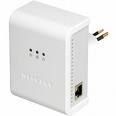
    The answer: Purchase a Powerline Ethernet Adapter which creates an Ethernet network out of your homes electrical system. Plug one adapter into an electrical outlet near the router attached to my basement office computer. Attach the router to the first adapter. Plug the second adapter into an electrical outlet in my wife's office. Attach an Ethernet cable to that adapter and her computer... and like magic, her work laptop is attached to the Internet via the router in the basement. The connection speed is that same as if she was connected to the router in my office.

    I went with a Netgear HDX101 200Mbps Powerline HD Ethernet Adapter because my wireless router is also a Netgear model. It cost around $160.00 and installation took the time to plug the two adapters into the electrical outlets on the wall!